Stop treating AI like a smart chat. Run it like a company.
Give every agent a clear role, let a main agent coordinate the work, keep irreversible decisions with you, and bring in the whole team only when the task is worth the extra tokens.
Watch the reel
You moved from chat to code. You built a few agents, each in its own folder. Then suddenly they were everywhere.
More agents did not fix it. Structure did. We organise ours like a small company: one person sets the direction, a main agent coordinates, and specialists do the work in their own area.
Why agents get messy
Every new agent starts with its own instructions and its own view of the project. Without clear owners, the same question gets two different answers, the same file gets written twice, and you end up routing every request yourself.
The symptoms are familiar:
- Information overlaps: two agents keep their own version of the same facts.
- Work gets duplicated: nobody knows a task is already done.
- Nobody owns the result: you cannot tell which agent to ask, or which answer to trust.
Draw the org chart
Give every agent a job title before you give it more work.
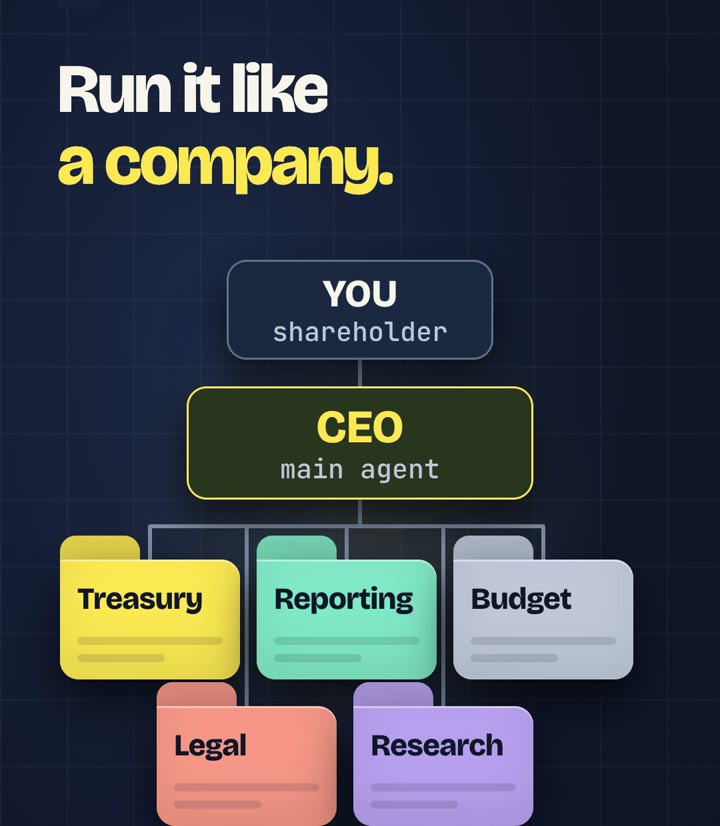
- You are the shareholder. You set the direction and approve anything irreversible: sending an email, posting to the ERP, paying, deleting.
- Your main agent is the CEO. It knows who handles what, splits the work, assigns it and checks the reports. It can do quick things itself.
- Your other agents are the specialists. Treasury, reporting, budget, legal research: each one owns an area and does the actual work there.
One folder per role
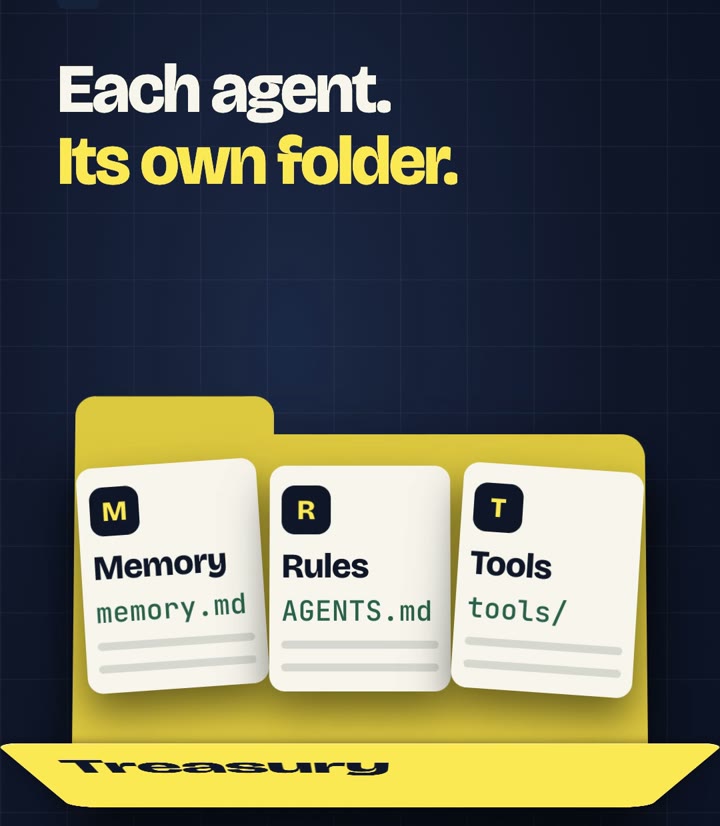
One folder, one agent, one owner. Each specialist keeps three things in its folder:
- AGENTS.md — rules: what this agent does, what it must never do, how it reports back
- memory.md — decisions and facts it should keep between sessions
- tools/ — the scripts and connections this job needs, and nothing more
If the folder idea is new, start with From chat to code. To keep each agent's memory from going stale, see Save the context.
Plug tools in through MCP
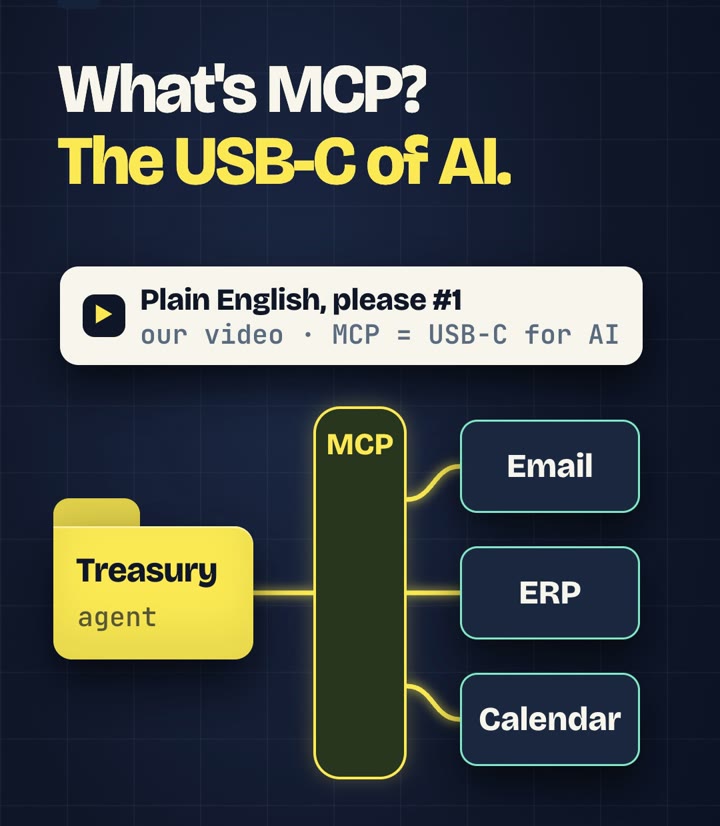
Specialists often need to reach outside their folder: email, an ERP, a calendar. MCP (Model Context Protocol) gives an AI app a standard way to connect to those tools. It is the USB-C of AI, as we explained in our Plain English video.
MCP servers can expose tools backed by an API, and a script can also call an API directly. Steps that do not need a model, such as moving a file or totalling a column, are often better as plain scripts. Give each specialist only the connections its job needs. See the official MCP introduction.
Delegate in writing
Agents do not need to chat with each other. Give the CEO a goal; it breaks the goal into tasks and sends each specialist a short written brief:
Task: next month's cash forecast, bank balances only
Inputs: the latest bank export in treasury/data/
Output: one table and the three main risks
Checks: totals match the bank export
Limits: read-only; do not send or post anything
Each specialist returns one report. The CEO checks the results, merges them and reports back to you. It can also pick a suitable model for each brief: a lighter one for structured work, a stronger one where judgement matters. We compared that trade-off in Cheaper tokens can mean a bigger bill.
Watch the bill
It feels like magic, until you check your usage.
Every agent loads its own context, and every assignment, handoff, report and review costs tokens. Anthropic published the scale of the effect for its own multi-agent research system:
| Anthropic's published data, June 2025 | Tokens compared with a chat |
|---|---|
| A single agent | about 4× |
| A multi-agent system | about 15× |
Their conclusion is useful for anyone building a team: it pays off when the task is valuable enough to cover the extra work, and it is a poor fit when every agent needs the same context or depends heavily on the others. Source: Anthropic, How we built our multi-agent research system, 13 June 2025.
From de-identified logs of one real finance setup, separate from this account and not a controlled test: two medium-sized comparisons came out at roughly 4× the cost of a single chat when repriced at the same API rates. A large project with five independent parts was estimated at roughly 0.8× the cost of a single chat, with scenarios ranging from 0.6× to 1.1×. Coordination represented 9–15% of API-equivalent cost in the finance examples; the lead chat in the code-review comparison represented about 24%. These are cost comparisons, not token ratios or subscription charges; quality and time savings were not established.
On a subscription you may not see a bill per token, but the usage limit fills up faster.
Choose the route
Use the structure, not the whole company, for every request.
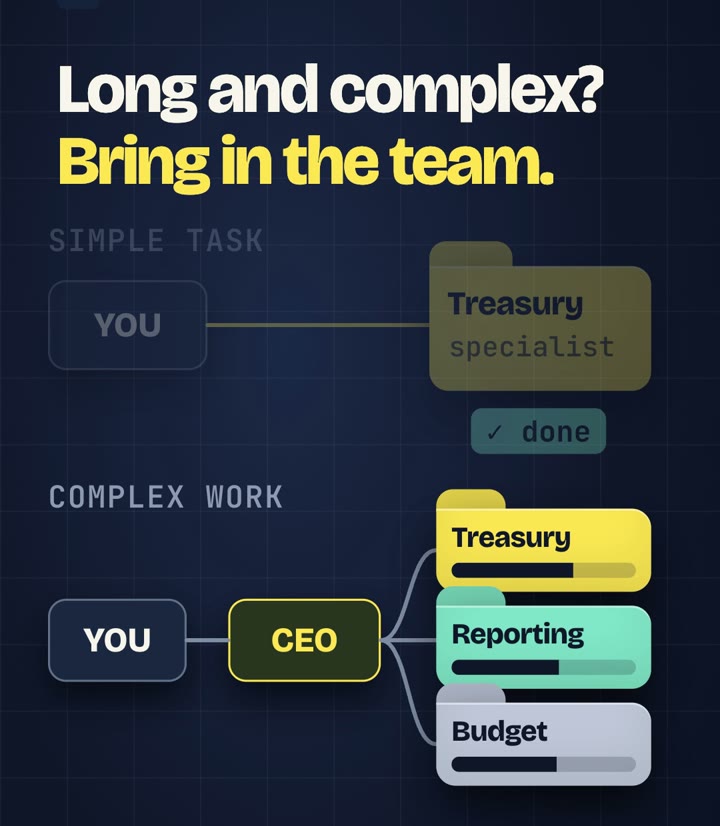
- Clear, simple task: go straight to the specialist. One context, no handoffs.
- Long, complex work that splits into independent parts: go through the CEO. Focused agents can work in parallel.
- Unsure, or need the status: ask the CEO to identify the owner and the checks needed. Allow for the extra coordination cost.
Start small
- Start with the CEO and two or three specialists for work you repeat every week or month.
- Write the rules file for each folder before you add the agent.
- Agree one report format, so the CEO can check results quickly.
- Keep anything irreversible behind your approval.
- Check usage after a week. Add a specialist only when a role clearly repeats.
Every agent, a clear role. The team, only when it's worth it. The final decision, with you.
Want to build your own AI team? Follow along on Instagram, @thinkingcornerlab: we'll show you how.
Illustrated workflow: the reel animates a fictional example, not a recording of a real run, and the usage panel is an illustrative quota, not real account data. The 4× and 15× figures are Anthropic's published data for its own research system (13 June 2025), not a measurement by The Thinking Corner. The figures in the aside come from de-identified logs of one real working setup, not a controlled test. The reel uses an AI voice by ElevenLabs.