Save the context: two files, one habit
Keep the rules, the unfinished work and the reasons behind your decisions in your project folder. Then start a new AI chat with a clear place to pick up.
Watch the reel
You open a new chat. The files are there, but you still have to explain what was sent, what is waiting and what you asked the AI not to do yet.
Our habit is to leave a short handover in the project folder. One file holds the rules that should keep applying. Another holds where we stopped. You can read both before the next chat uses them.
This is part 2 of From chat to code, where we moved a fictional client's work into a folder with explicit rules. Here is how we carry the unfinished work into a new chat.
The habit
- 01 · SAVEFinish with “save context”
Use the skill below when a task is done or before closing the chat. Check the two files it writes.
- 02 · OPENNew chat, same folder
Keep the files with the work so the next chat can find them.
- 03 · RESUME“Where were we?”
Read the reply before carrying on. Check what is done, what is waiting and the next step.
You can do this with our free skill for Claude Code and Codex, or with the two short prompts at the end. save context uses the installed skill; it is not a built-in command in every AI app.
Two files, two jobs
| File | What belongs there | Example from our test |
|---|---|---|
AGENTS.md in Codex; CLAUDE.md in Claude Code | Lasting rules and decisions, with the reason | Quotes are valid for 30 days because prices change every quarter. |
context.md | Current progress, pending decisions and next steps | Wait for Cafe Luma's OK on the date. Don't prepare the logo quote yet. |
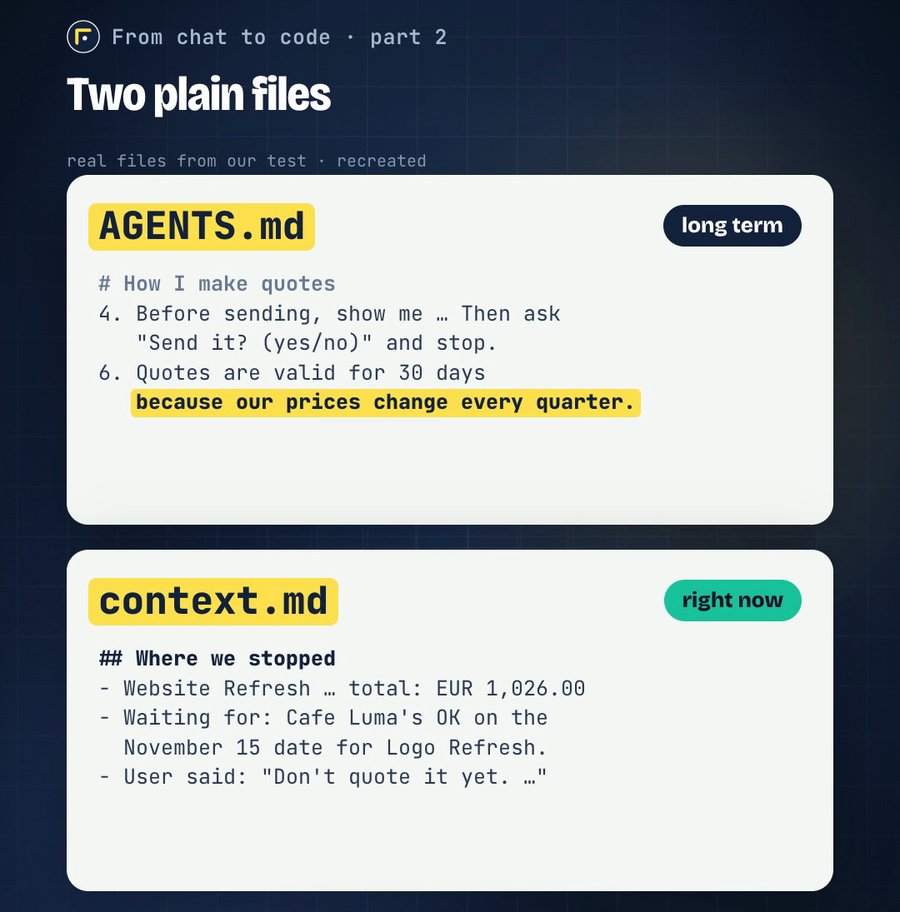
The rules file is updated as lasting decisions change. context.md is replaced when we save, so the next chat gets the current situation rather than a growing diary. Our test and the reel use Codex, so the rules file shown there is AGENTS.md.
Finishing a task does not turn it into a rule. A client's approval updates the task's status in context.md or the relevant work file. Only decisions that should keep applying belong in the rules file.
Codex reads AGENTS.md before working; Claude Code uses CLAUDE.md. We offer a separate edition for each app, using its native file name. In that file, the skill adds:
New chat? First read @context.md (where we stopped and what's next).This gives the next chat an explicit place to start. If your project already shares rules between apps through an import, the skill preserves that setup.
What our test showed
We used a fictional client, Cafe Luma, in Codex. A Website Refresh quote for €1,026 before tax had already been approved and sent to a demo mailbox. Then we added a lasting rule:
From now on, our quotes are valid for 30 days, because our prices change every quarter. Nothing to change in this quote.
And a pending request:
Cafe Luma replied: they also want a Logo Refresh, but only if it's ready by November 15. Don't quote it yet. We wait for their OK on the date.
After save context, the existing rules remained in AGENTS.md, with the new rule and a pointer to context.md. The handover was 25 lines. This excerpt shows the instruction that mattered:
- Waiting for: Cafe Luma's OK on the November 15 date for Logo Refresh.
  They only want it if it is ready by that date.
- User said: "Don't quote it yet. We wait for their OK on the date."
  No Logo Refresh quote has been prepared or sent.
In a new chat, we asked “Where were we?” It recovered the sent quote and the pending logo, including this line:
Completion by that date is still unconfirmed, and you asked us not to prepare that quote yet.
It kept the reason for waiting and did not prepare the logo quote.
We use the same habit every day in Claude Code. The run shown here, and the token count below, were measured in Codex.
What changed in the token count
We also asked “Where were we?” in a new chat without context.md. It still found the right answer: it searched the folder and pieced together the PDF, the sent email and a note the agent had left earlier.
The difference was how much input went through the model calls for the reply:
ONE CODEX COMPARISON
64% fewer input tokens
Without context.md82,277
With context.md29,741
Both chats recovered the pending task. Totals include cached input across all model calls for each reply.
That is about 64% less input in this comparison, not a promise for every project. We did not measure a saving in money or response time. Caching can affect both, so a token count alone does not tell us either result.
The practical benefit was a clear handover to read, rather than relying on a search to find the right clues.
Why save it yourself?
Long chats accumulate messages, files and tool results. Apps manage the limit by clearing or summarizing parts of that context. Useful details can be lost; Claude Code's own guide recommends keeping persistent rules in a project file.
Apps also have their own memory features. Those can help, but they choose what to keep and use separate stores. Codex's guide recommends project instructions for guidance that must keep applying. A handover is something we can check and use across tools.
Our reminder is to save when a task is done, or at about two-thirds full. Two-thirds is our habit, not an official threshold. In Claude Code, use /context or the Context card in the current desktop layout. Older layouts show context usage in the ring's popover; the ring can also show plan usage. Check your layout here.
One thing we didn't expect
With the skill installed, Codex added the 30-day rule and later wrote its own context.md, before we asked it to save. That first handover lacked the template and an explicit pointer from AGENTS.md. save context organized it.
That was an observation from this run, not proof that installing the skill always causes that behaviour. We still ask it to save and check the result.
Try it
With the skill: send us context on Instagram for the installation page. Choose Claude Code or Codex and copy the message that asks your AI to install the right edition. Read the instructions before installing it.
Without installing anything, paste this before closing:
Before we close: update this app's project instructions with any lasting rules or decisions we made, and why. Then write context.md with where we stopped, what's still pending and the next steps. Keep it to one page.
In the new chat:
Read the project's instructions and context.md and tell me where we are. Then wait.
Before closing the old chat, check names, dates, decisions and pending work. Keep passwords and keys out of both files. Open the next chat in the same project folder.
Fictional client and data. Codex CLI 0.162, GPT-6.1 Sol, 14 October 2026. The token comparison comes from the first experiment; the file excerpts and quoted reply come from a second experiment using skill version 0.3. These were separate runs in clean project copies. The reel recreates the runs with an illustrative meter and memories, and uses an AI voice.